Banyan is the new VPN solution that is replacing NetExtender (Windows) and Sonicwall (iOS and Android) applications
Downloads
- Click Here to download Banyan
Instructions and Installation Guides
Frequently Asked Questions
Q: How long does my VPN session last?
A: 8 hours – After 8 hours you will be prompted to reauthenticate to maintain a secure session
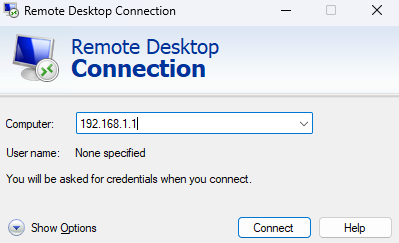
Q: How do I remote to my desktop?
A: Open the remote desktop application on Windows and enter your assigned IP address in the “Computer” Field and click connect. You will then be prompted for your Username and Password. These are the same ones you use to log into your PC.
Q: Where can I find my IP address for my PC?
A: Email or call Pat or Zach for your assigned address
Q: How do I sign out when I’m done?
A: You can open the Banyan app and click the power button in the middle to end your session. It will go gray and say disconnected when it successfully disconnects.
